Track visitors and bookings with Google Tag Manager
1:03 video · For owners
Why it matters
Running Instagram or Google ads? Tag Manager shows which ones turn into bookings, with no code to install.
Step by step
- Create a free Web container at tagmanager.google.com and copy its ID, which starts with GTM-.
- In Calende, click Settings, paste it into Google Tag Manager Container ID and click Save changes.
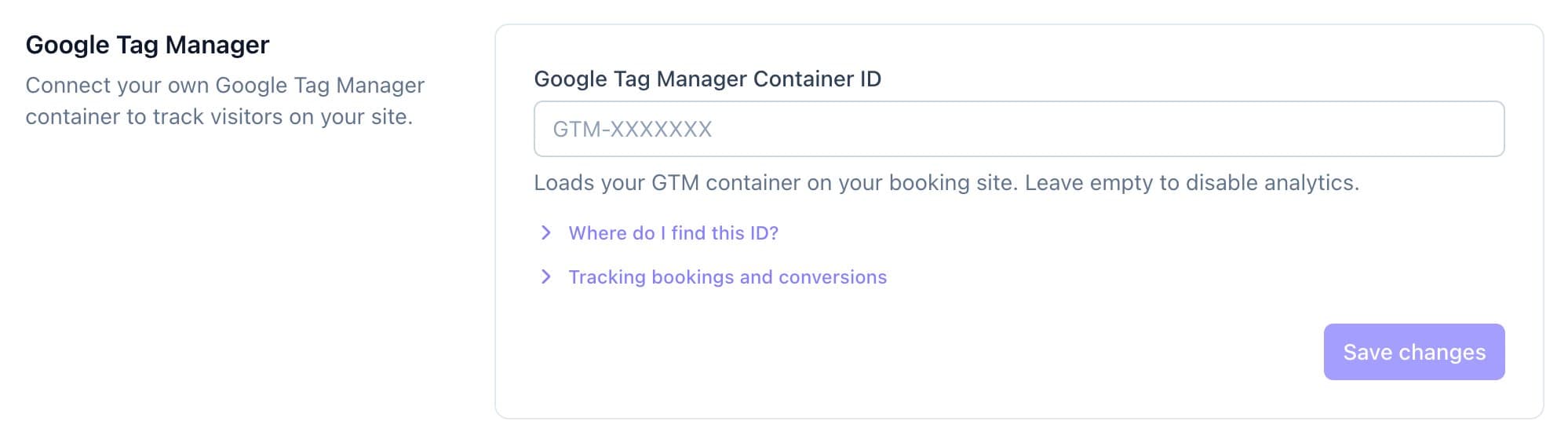
Paste your container ID, then Save changes. - Open Where do I find this ID? for help setting up Google Analytics inside Tag Manager.
- Open Tracking bookings and conversions to see the events your site sends.
Good to know
- Count purchase as a conversion if clients pay upfront, or generate_lead if you approve requests first.
- Calende doesn't add a cookie banner, so set up consent in Tag Manager if you have visitors in Europe.
- Enter the container ID in capital letters.